Most commerce teams I talk to want the same thing: faster pages, better search, smarter merchandising. What they do not want is an 18-month replatform that touches every integration, every custom module, and every checkout flow that already works.
That tension is exactly what Adobe Commerce Optimizer is built around. Announced at Adobe Summit 2025 and covered in more detail in Adobe’s June 2025 blog post, Commerce Optimizer (ACO) is a SaaS layer that upgrades your top-of-funnel experience while your existing backend keeps handling cart, checkout, and orders.
This post walks through what it is, who it helps, how the pieces fit together, and where to start if you are evaluating it for your own stack.
What is Adobe Commerce Optimizer?
ACO is not a full commerce platform replacement. Per the official overview, it is a SaaS-only optimization layer that sits between your catalog sources and your shoppers.
You ingest product data from wherever it lives today: Adobe Commerce, a PIM, an ERP, even flat files. That data flows into Merchandising Services, Adobe’s catalog engine built around catalog views and policies. Your storefront reads from there via GraphQL. Cart and checkout can stay on your current platform, connected through API Mesh and App Builder.
The pitch is straightforward. Grow and scale catalog data without re-platforming the whole stack. Improve search and recommendations with AI. Ship a high-performance storefront without touching the transactional backend your ops team already trusts.
Adobe has a five-minute overview video if you want the visual walkthrough before reading further.
Who should actually look at this?
Three use cases keep showing up in the documentation, and they are specific enough to be useful as a filter.
Merchants who want to keep their backend. Your order management, payment gateways, and fulfillment integrations stay put. You modernize home, category, product, and content pages instead.
Businesses with a separate cart and checkout system. Maybe Salesforce owns transactions. Maybe a custom OMS does. ACO handles discovery and presentation; your existing system handles the money.
AEM customers managing product visuals separately. If you already live in the Adobe Experience Cloud and want product images and assets tied to a third-party commerce engine, the Product Visuals integration is worth a look.
If none of those sound like your situation, ACO probably is not the right conversation. If one of them made you nod, keep reading.
The four pieces that matter
Merchandising Services
This is the core. Adobe separates product data (SKUs, attributes, prices, assets) from product context (catalog views, policies, locales). That split sounds academic until you need to run a B2B dealer catalog, a D2C storefront, and a marketplace feed from the same product master without copying SKUs three times.
Developers interact with three main surfaces, documented in the Merchandising Services Developer Guide:
- The Data Ingestion API (REST) for loading products, attribute metadata, price books, and prices
- Catalog Views and Policies in the admin UI
- The Merchandising API (GraphQL) for storefront queries
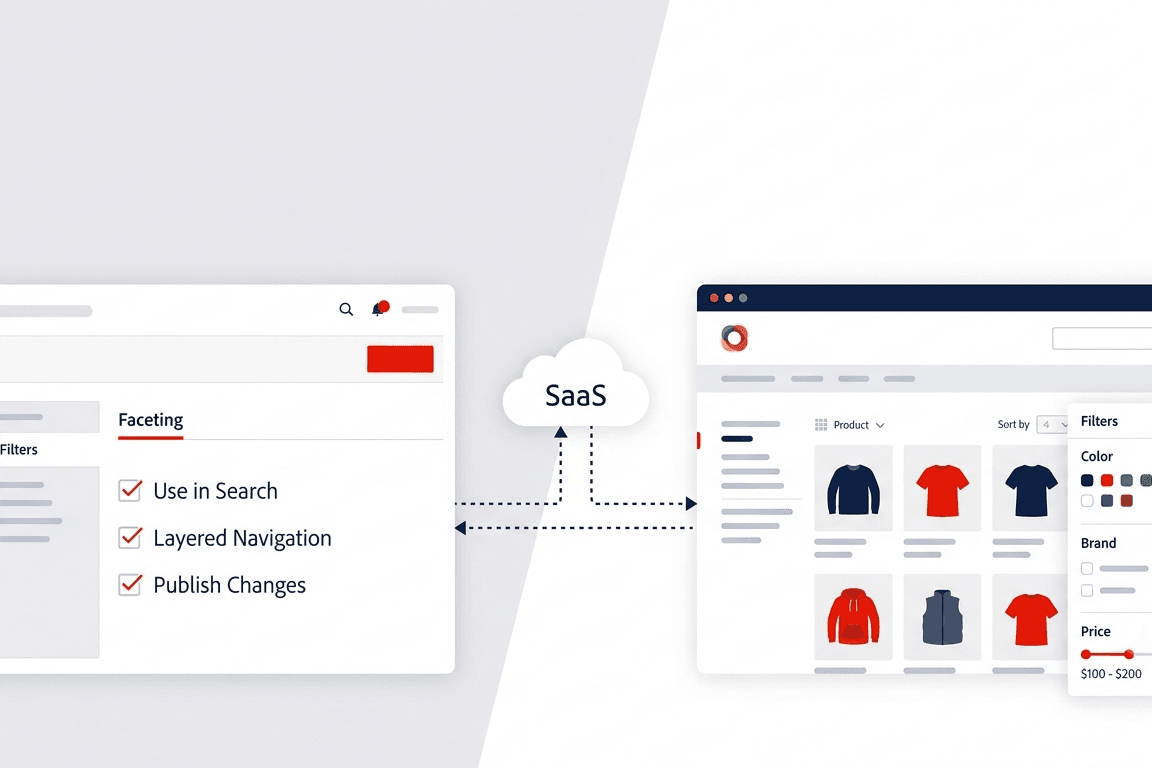
The admin side gives merchandisers search rules, facets, synonyms, and AI-powered recommendations without opening a ticket with engineering for every campaign tweak.
Commerce Storefront on Edge Delivery
The storefront setup guide covers building a headless storefront with Edge Delivery Services. Adobe’s Site Creator tool scaffolds a project with boilerplate code, sample content, and commerce configuration. The docs estimate 30 to 45 minutes for a basic setup.
You get prebuilt components for product listing pages, product detail pages, search, and filtering. Adobe’s own marketing cites HanesBrands seeing page load speeds four times faster and Lighthouse scores reaching 100 after adopting Commerce Storefront. Take vendor benchmarks with the usual grain of salt, but the performance angle is real: Edge Delivery is the same infrastructure Adobe uses for fast content delivery elsewhere.
Deeper customization lives in the Commerce Storefront documentation.
Discovery, merchandising, and measurement
Inside the Optimizer admin (called Commerce Optimizer Studio), you get dashboards for the things merchandisers actually care about:
- Search performance: which terms shoppers use, where click-through drops off
- AI recommendations: units like “customers who viewed this also viewed,” managed directly in the UI
- Merchandising rules, facets, and synonyms for tuning search behavior
- Before-and-after KPI reporting with PDF export
- Data Sync and Events pages for verifying catalog ingestion and storefront eventing
Semantic search is on by default. Exact and near-match ranking is configurable. Details are in the search matching and ranking docs.
Integrations with what you already run
The integrations overview covers the main connectors:
- Adobe Commerce Optimizer Connector for syncing catalog and pricing from Adobe Commerce on-prem or cloud
- Product Visuals with AEM Assets for centralized image management matched by SKU
- Salesforce Commerce Connector for pulling catalog and price data from Salesforce B2C without leaving that backend
- AEM Sites Optimizer for AI-driven optimization opportunities (requires an Ultima license)
One thing the docs stress repeatedly: match your environments. Sandbox Optimizer instances go with non-production commerce environments. Production pairs with production. Mix them and you get inconsistent catalog data, broken search behavior, and metrics you cannot trust. Obvious in hindsight, painful when you skip it.
How the architecture fits together
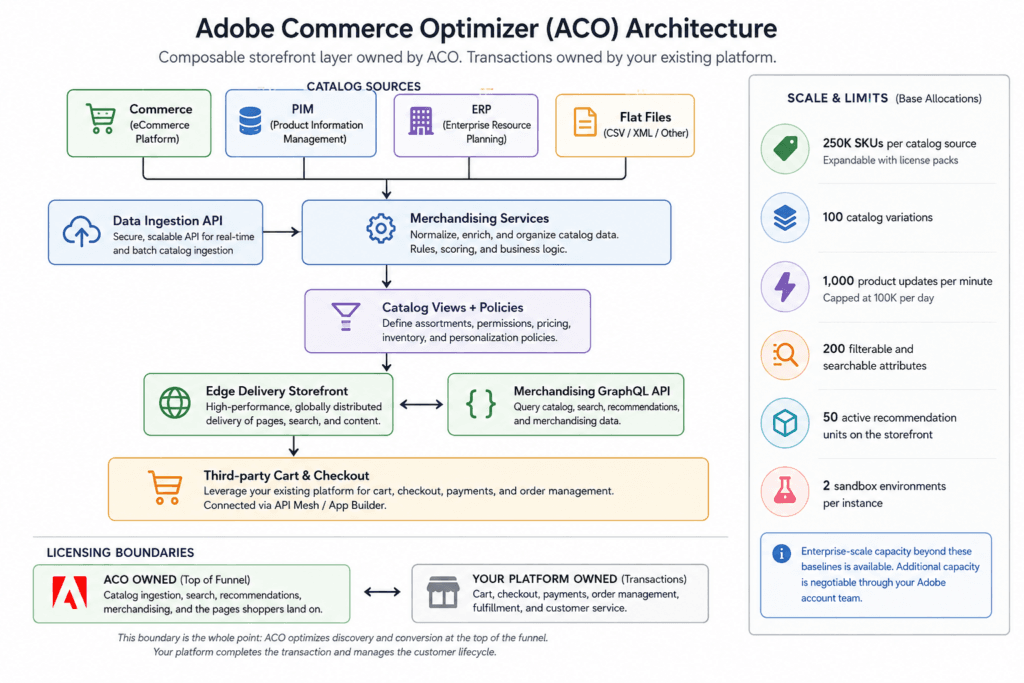
ACO owns the top of the funnel: catalog ingestion, search, recommendations, and the pages shoppers land on. Your existing platform owns transactions. That boundary is the whole point.
For the full diagram and licensing boundaries, see the architecture section and limits and boundaries in the official docs.
What about scale and limits?
The limits doc is worth reading before you pitch this to leadership. Base allocations include:
- 250K SKUs per catalog source (expandable with license packs)
- 100 catalog variations
- 1,000 product updates per minute, capped at 100K per day
- 200 filterable and searchable attributes
- 50 active recommendation units on the storefront
- 2 sandbox environments per instance
Adobe’s marketing blog mentions enterprise-scale numbers well beyond these baselines. For a blog or a business case, cite the official limits and note that additional capacity is negotiable through your Adobe account team. Do not promise 250 million SKUs on a standard license.
Getting started
The get started guide breaks setup into a sequence most teams can follow in a sandbox before touching production.
Administrators create an instance in Commerce Cloud Manager (Commerce > Add Instance > Commerce Optimizer), configure users, and set up catalog views and policies.
Developers grab instance credentials (GraphQL endpoint, catalog endpoint, instance ID), ingest catalog data via the Data Ingestion API or a connector, and configure the Edge Delivery storefront.
Merchandisers configure search, facets, synonyms, and recommendations, then watch success metrics and search performance dashboards.
Adobe provides sample catalog data on GitHub based on a Carvelo automotive parts scenario. Good for learning the admin UI before you point it at real product data.
Step-by-step tutorials are at Commerce Optimizer tutorials on Experience League.
What Adobe said when they launched it
The dedicated launch blog from June 2025 focused on four themes: Edge Delivery storefront speed, self-service content authoring and A/B testing, flexible enterprise merchandising, and no backend replatform.
The broader Summit announcements post positioned ACO next to Adobe Commerce as a Cloud Service and introduced the Commerce Developer Agent for helping teams migrate legacy implementations to modern storefront components.
Worth noting: ACO and Commerce as a Cloud Service are related but different products. Optimizer overlays your existing backend. Cloud Service is the full-stack SaaS platform. Some teams will end up on one, some on the other, and some may use both in different parts of the business.
Where this leaves you
If your storefront is slow, your search is mediocre, and your merchandising team cannot ship changes without a deploy cycle, you do not necessarily need a replatform. You might need a better front end and a catalog layer that is not welded to your transactional system.
Adobe Commerce Optimizer is Adobe’s bet that a lot of merchants are in exactly that spot.
It is SaaS-only, Adobe-managed infrastructure. It requires entitlements and an Experience Cloud account. It has real capacity limits. And it assumes you are willing to run a headless storefront on Edge Delivery rather than patching your existing Luma theme.
None of that is a dealbreaker for the right team. For the wrong team, it is a expensive detour.
Start in sandbox. Load the sample data. Build a storefront with Site Creator. Run a search query. See if the admin UI makes sense for your merchandisers. That takes a few days, not a few quarters, and it is a better basis for a decision than any blog post, including this one.
Official resources
- Adobe Commerce Optimizer overview
- Get started guide
- Storefront setup
- Integrations overview
- Limits and boundaries
- Merchandising Services Developer Guide
- Commerce Storefront documentation
- Commerce Optimizer tutorials
- Adobe Commerce Optimizer product page
You may also like…
Adobe Commerce Cloud Project Structure
How to Set Composer Version in Adobe Commerce Cloud Projects